Invoicing and bookkeeping
Invoices from the booking
Invoices, credit notes and the VAT on each line come from the booking and its payments, so what your accountant sees matches what the customer paid. At the end of a VAT quarter or tax year, export the period for your bookkeeping software.
An invoice, not a re-type
The invoice is built from the work booked and the money taken, not typed up again afterwards.
When a booking is paid, METBooker can produce the invoice as a PDF and email it to the customer automatically, or you can raise it yourself. Line descriptions can be edited before it goes, extra lines added, and the invoice amended later with the earlier version kept. Invoices, receipts and credit notes each have their own numbering with your prefix.
Example. A service booked online at a fixed price gains a replacement part on the day. Staff add the part to the booking, take the balance on the card reader, and the invoice shows both lines with the right VAT.
Invoices and credit notes are configured for your account during onboarding.
VAT, line by line
Tell METBooker whether you are VAT-registered and give your VAT number. Each service and add-on carries its VAT treatment, and any line can be changed on the invoice. Prices can be entered with or without VAT, and the help guide explains how METBooker sets the tax point.
- VAT treatments
- Standard, reduced, zero-rated, exempt, outside the scope
- Prices
- Entered with or without VAT
- Not VAT-registered
- Invoices without VAT
- Period totals
- VAT and sales for any period, on screen
Exports for your accountant
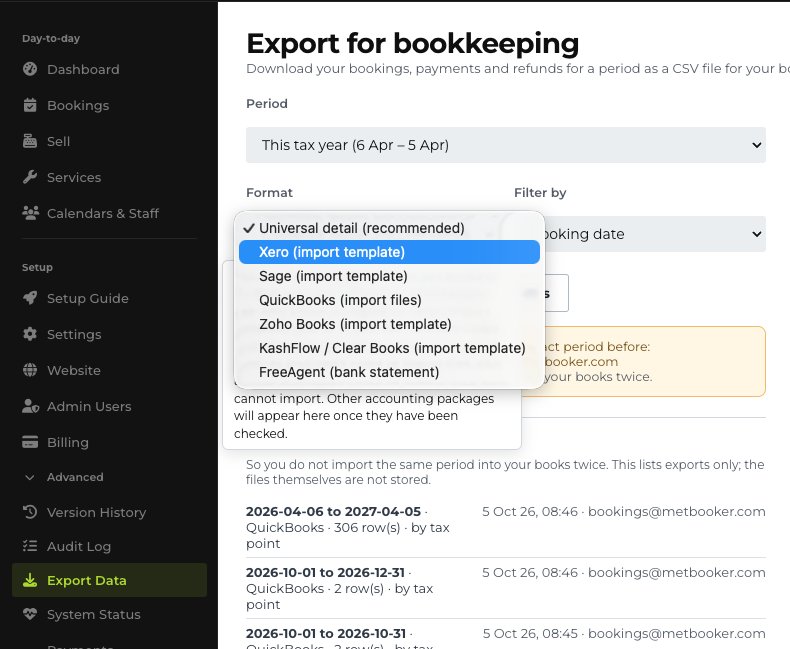
Choose a period, a VAT quarter, a tax year or your own dates, and whether to report by booking date or payment date. METBooker produces a CSV file laid out for the package your accountant uses, and keeps a log of what was exported. Super Admins and the Accountant role can export.
These are files for your accountant's software, not a live accounting connection, and METBooker does not file VAT returns. You can also download a complete copy of your account's records at any time.
| Format | Availability |
|---|---|
| Universal CSV | Standard |
| Xero | Standard |
| QuickBooks | Standard |
| Sage, Zoho, KashFlow, FreeAgent | Additional formats, configured during onboarding |
Invoices and VAT in the product
Common questions
Does METBooker connect directly to Xero or QuickBooks?
No. For customers, QuickBooks, Xero and the other packages are export-file destinations: METBooker produces a file the package can import. It does not post into them directly.
Does METBooker match payouts to my bank account?
No. Matching provider payouts to your bank stays with you or your bookkeeper, because providers batch payouts and deduct fees. METBooker records each payment and refund against the booking.
Does it file my VAT return?
No. It gives you VAT figures by line and by period, and exports them for the software or the person who files your return. It does not submit returns to HMRC.
Can I change an invoice after it is sent?
Yes. Amending an invoice keeps the earlier version, and an invoice can be voided. Money returned to a customer is shown with a credit note rather than by editing the original.
Are invoices included as standard?
Invoices and credit notes are part of the plan but are configured for each account during onboarding rather than switched on from day one, so tell us when you start if you want them.
Where next
Invoices close the job. The owner's view shows what is still owed across all of them.