
Book a demoSee pricing

Booking, diary and payment software for automotive businesses

Get Found. Get Booked. Get Paid.

METBooker helps garages and automotive specialists get found online, take bookings, organise the diary and get paid. Customers can book online while your team manages phone, walk-in, workshop and mobile jobs in the same system, with vehicle details, staff allocation, deposits, balances and invoices kept with the booking.

Built from real experience of running automotive services.

One diary, however the work arrives

A garage or specialist does not receive work through one tidy channel. A customer may book online, phone the front desk, walk in, drop a vehicle off or ask for work that needs to be checked before it can be accepted. METBooker can put those routes into one diary, with the same services, durations, staff eligibility, deposit rules and availability behind them. Staff booking routes and other controlled capabilities are configured during onboarding.

  1. Customers book online

    Customers see services and times that fit the availability rules you have set.

  2. Front of house books for them

    Phone, walk-in and drop-off work enters the same diary rather than a separate paper trail.

  3. Specialist work can be requested

    Review the vehicle or job before accepting it, then request a deposit, full payment or no payment.

  4. Mobile work includes the journey

    Coverage, travel time and surrounding jobs are considered before a customer is offered a slot.

Configured for the work you actually do

Four real operating models. Choose yours to see the workflow in full.

Garages and MOT centres

Let customers book online while front-of-house staff add calls, walk-ins and drop-offs once staff booking is configured. Give each technician a calendar, assign the services they can perform, allocate eligible work by rota, workload or priority, check vehicle and MOT information, and collect the balance at the counter, by link or through your chosen recorded payment method.

Garages and MOT centres: the full workflow
Mobile mechanics

Define where you travel. Offer a time only when the journey fits around the engineer's other work, write travel into the calendar, take a deposit before setting off and send a payment link or QR code at the roadside without relying on a separate card reader.

Mobile mechanics: the full workflow

Tuning specialists

Build services and configured add-ons around diagnostics, ECU and component work, remapping and rolling-road sessions. Review unsuitable requests before confirming them, collect deposits and keep the vehicle, work and payment record together.

Tuning specialists: the full workflow

DPF specialists

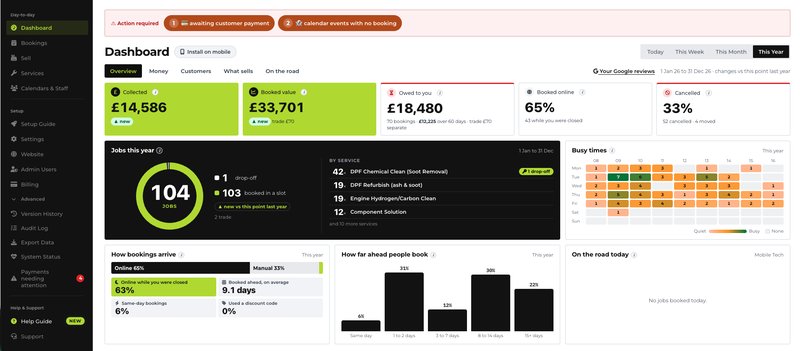
Model diagnosis, removal, cleaning, testing and refitting as the services your business actually sells. Handle workshop, mobile, component-only and trade drop-off work, protect machine capacity with daily limits, and take deposits or balances against the same job.

DPF specialists: the full workflow

Website add-on

Get found. Get booked. Get paid.

The Website add-on turns the business and service information you manage in METBooker into clear public pages that customers, search engines and AI assistants can read, with booking and payment built into the journey.

Try a working demo

This is a working METBooker demonstration, set up as the The no-nonsense deposit up front garage business: choose a service and add-ons, and only times an appropriate engineer can take are offered. Do not enter real personal, vehicle or payment information; use the test card 4242 4242 4242 4242, expiry 01/29, CVC 123.

See all four demonstrations on the Demo page

The no-nonsense deposit up front garage live demonstration

The demonstration runs in the METBooker booking app, which uses Google reCAPTCHA and Google Analytics. They can set cookies, so it loads only when you ask.

Open it in a new tab

More than an appointment calendar

Six things generic booking tools miss, each explained in depth on its own page.

  1. Feasible mobile bookings

    Coverage areas, travel time, traffic and surrounding work help determine which times can be offered.

    How travel-aware booking works
  2. Automotive vehicle context

    Registration lookup, vehicle details and MOT history are available with the booking to support operational checks.

    Customers and vehicles
  3. Service-aware allocation

    Assign services to the people who can perform them, then use round-robin, least-busy or priority allocation to distribute eligible jobs.

    Team and operations
  4. Payments without a counter

    Collect deposits and balances online or send links and QR codes to customers away from the workshop.

    Payments
  5. Industry evidence records

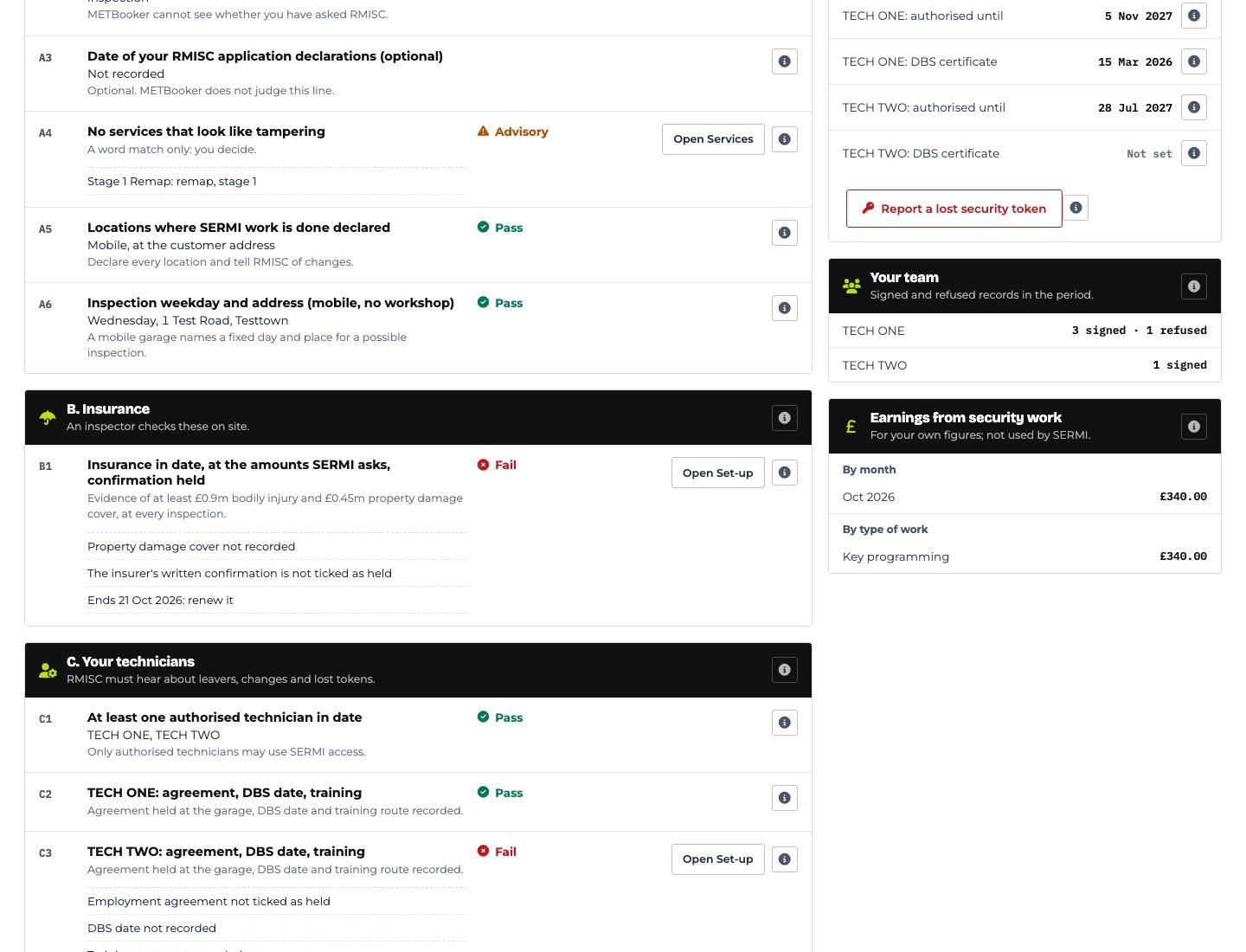
    Support structured, tamper-evident SERMI records where that paid capability is enabled.

    SERMI records
  6. Operational control

    Roles, audit information, configuration history, exports and exception lists help owners maintain oversight.

    Security and resilience

See the workflow, not a promise

Real METBooker screens captured on a demonstration business with synthetic data. Each caption says which decision or job the screen helps with.

Designed from both sides of the problem

METBooker brings together two forms of experience that automotive software rarely combines. Mobile Eco Tuning brings the detail of how workshops, mobile agents, specialist jobs and customer hand-offs work in practice. Founder Michael Simpson brings nearly three decades across information systems, sensitive operational environments and cybersecurity, including more than 20 years working with mission-critical systems. One shapes the functionality. The other shapes the platform beneath it.

Designed for information your business cannot mishandle

Automotive bookings can contain names, addresses, contact details, vehicle registrations, work notes, payment status and evidential records. METBooker is designed around controlled access, encryption of selected personal fields, managed encryption keys, tenant data export, monitored database backups and documented incident and recovery procedures. Targeted subject access and erasure are assisted by METBooker rather than self-operated by a garage.

What it costs

One core plan for the day-to-day platform, with clearly priced optional capabilities. No charge per booking and no METBooker percentage taken from customer payments. Prices exclude VAT and the subscription rolls monthly.

Core plan
£38 a month, plus VAT
Website add-on
£5 a month, plus VAT
SERMI Records add-on
£15 a month, plus VAT
Trial
Free trial. No card required.

Common questions

Anything else, email admin@metbooker.com.

Is METBooker a garage management system?

METBooker is an automotive booking and operations platform. It connects booking, diaries, vehicle details, payments, selected invoicing and day-to-day workflows. It is not presented as a replacement for every estimating, parts, stock or accounting function in a full garage management system.

How does METBooker relate to Mobile Eco Tuning?

METBooker is a fundamental part of how Mobile Eco Tuning runs its day-to-day operation and supports its agent network. It is also available as its own subscription to garages and specialists outside MET. An MET agent package does not include it automatically.

Can customers and staff both make bookings?

Yes, once the staff-booking capability is configured for the account. Customers can book online, while staff can add phone, front-counter, walk-in and drop-off work to the same diary. Jobs that need checking first can arrive as requests for the business to accept or decline where that workflow is configured.

Does mobile booking account for travel?

METBooker can use the business's coverage settings, the engineer's surrounding jobs and travel time for that time of day before offering a mobile slot.

Can an engineer take payment without a card reader?

Yes, where payment links are configured. A business can send a payment link or present a QR code so the customer can pay on their own device. Supported manual methods can also be recorded against the booking.

How does METBooker protect customer information?

The platform uses role-based access, multi-factor authentication for password accounts, encryption for selected personal fields, a separately managed encryption key, tenant isolation, route-specific protective controls, exports, retention workflows and documented database backup and recovery controls. The Security and Resilience page explains the scope, including Cloud Storage files that are outside the current scheduled off-site backup.

See it set up like yours

Tell us how work reaches your business and we will show METBooker using the closest demonstration setup: workshop, mobile, tuning or DPF.

Setting up is a guided job, not an IT project. How setup and onboarding work