
The platform
Get found. Get booked. Get paid.
Seven outcomes, in the order a customer meets them. METBooker keeps the customer-facing and operational stages of a job connected, from booking and vehicle details to payment, completion and invoice. Each outcome below starts with a real scenario, then the capabilities, the limits and the page that explains it in depth.
01
Get found by the right customers
Scenario. Someone searches for a DPF clean or an MOT near them. They find a clear page about the business, its services, prices, area and opening hours, can see why it can be trusted, and can book from it straight away.
The Website add-on: public pages built from the business and service information you manage, customer discovery, search visibility, content search engines and AI assistants can read, Google reviews where configured, and a direct route into booking.
An optional paid add-on. Designed to be discoverable and understandable; nobody can promise indexing, ranking, AI citation, traffic or bookings.
Read about Website add-onWebsite Add-on and Marketing: 24 features
- Managed business website
- Own-domain support
- Managed domain setup
- Domain status checks
- Responsive website templates
- Integrated booking journey
- Service publishing
- Opening hours and business details
- Contact and enquiry form
- Map and location content
- Google rating and reviews
- Tuning lookup
- Heading size controls
- Structured data
- Automatic sitemap
- Search verification tools
- SEO controls
- Content-generation assistant
- Website event tracking
- White-label brand controls
- Booking-page themes and layouts
- Optional interface components
- Social and contact links
- Business email with managed website
02
Fill the diary with workable jobs
Scenario. A customer books a service online at 21:00 while the counter has already filled Thursday morning by phone. They are offered only the times that are genuinely free, and for mobile work only the times the engineer can reach.
Online, staff, walk-in, drop-off and requested bookings in one diary; services, durations, add-ons, buffers and opening hours; daily drop-off limits; travel-aware mobile feasibility; a slot held while the customer pays.
Staff bookings, add-ons, requested bookings, multi-service booking and mobile or mixed operation are configured during onboarding. Customers cannot yet move or cancel their own booking online.
Read about Booking and diaryBooking and Scheduling: 41 features
- 24/7 online booking
- Embedded or standalone booking form
- Mobile-first booking journey
- Live availability
- Calendar date and time selection
- Day availability indicators
- Temporary slot holds
- Overlap protection
- Service-duration scheduling
- Add-on duration scheduling
- Service buffer time
- Configurable slot intervals
- Advance-booking limits
- Minimum notice
- Same-day booking control
- Working days and opening hours
- Blocked dates
- Automatic expired-date clean-up
- Workshop bookings
- Mobile bookings
- Coverage-radius checks
- Live travel-time feasibility
- Travel estimates
- Drop-off bookings
- Daily drop-off caps
- Next-free-slot allocation
- Drop-off acknowledgement
- Manual bookings
- Walk-in sales and jobs
- Manual booking feasibility checks
- Booking rescheduling
- Booking cancellation
- Provisional booking requests
- Email accept or decline workflow
- Provisional expiry and reminders
- Accept with deposit, full amount or no payment now
- Automatic chasing of unpaid accepted requests
- Service unavailable times
- Book anyway for staff
- Maintenance mode
- Time-zone-aware scheduling
Services and Add-ons: 20 features
- Service catalogue
- Rich service descriptions
- Service categories
- Single-service booking
- Multi-service booking
- Multi-service compatibility checks
- Service-to-staff assignment
- Service visibility controls
- Manual service order
- Automatic service sorting
- Customer sorting controls
- Service-specific deposits
- Service discounts
- Optional add-ons
- Service-linked add-ons
- Multiple add-ons
- First add-on free offers
- Admin service modification
- Editable invoice line descriptions
- Custom sale lines
03
Put work with the right person
Scenario. Only two technicians do brake work. A brake service booked online goes to whichever of them is less busy, while a deliberate assignment is still possible.
A calendar for each person, the services each person can perform, and round-robin, least-busy or priority allocation of eligible work.
Allocation follows service eligibility; there is no separate model of each person’s abilities, no bay management and no rota planning.
Read about Team and operationsStaff and Calendars: 20 features
- Staff profiles
- Individual working hours
- Service eligibility: the services each person can perform
- Automatic staff allocation
- Round-robin allocation
- Least-busy allocation
- Priority-order allocation
- Manual staff choice
- Multi-staff services
- Google Calendar integration
- Microsoft 365 calendar integration
- METBooker-only calendars
- Per-staff calendar type
- Busy-event blocking
- Block-keyword rules
- Workshop and mobile calendar events
- Calendar connection checks
- Calendar provisioning and sharing
- Orphaned-event monitoring
- Staff-safe deletion
04
Keep customer and vehicle context with the job
Scenario. Before the car arrives, the counter can see the make and model, the MOT history and last year’s advisories from the registration.
Registration lookup, vehicle details, MOT history and MOT and tax status on the booking; searchable previous work; logged customer emails; MOT and service reminders where configured.
Vehicle data supports your own checks; it does not confirm insurance, roadworthiness or driver entitlement. Customer and vehicle details are held with bookings, not in a separate customer database.
Read about Customers and vehiclesCustomers and Vehicles: 13 features
- Customer details capture
- Invoice address collection
- Address autocomplete
- Business customer details
- Customer notes
- Booking history
- Vehicle registration lookup
- Structured vehicle details
- Full MOT history
- Automatic vehicle model lookup
- MOT and tax status awareness
- Vehicle-expiry acknowledgement
- Non-vehicle mode
Communications and Reminders: 19 features
- Booking confirmation emails
- Admin booking notifications
- Resend confirmation
- Reschedule notifications
- Cancellation notifications
- Service-modification notifications
- Ready-for-collection email
- Payment-link emails
- Invoice and credit-note emails
- Google review request
- Service and MOT reminder opt-in
- Automated due-date calculation
- Scheduled reminder emails
- Reminder management
- Reminder templates and placeholders
- Shared METBooker sender
- Custom Gmail sender
- Custom Microsoft 365 sender
- Support requests
05
Get paid and account for the money
Scenario. A deposit is taken online, a part is added on the day, the balance is paid by link at the roadside and a part-refund follows. Each is a line on the same booking, and the invoice and credit note come from it.
Deposits, balances, payment links and QR codes, the Stripe Terminal card reader, SumUp Solo integration coming soon, recorded manual payments, refunds, items needing attention, invoices, credit notes and bookkeeping export files.
Payment links, full online payment, the card reader, counter sales, invoices and extra export formats are configured during onboarding. Bookkeeping exports are files, not a live accounting connection.
Read about PaymentsPayments and Point of Sale: 27 features
- Online deposits
- Full online payment
- No-online-payment mode
- Per-booking payment ledger
- Live outstanding balance
- Cash payments
- In-person manual card payments
- Integrated card-terminal payments
- Customer-facing terminal basket
- Payment links
- Scan-to-pay QR codes
- Payment reminder button
- Payment-link cancellation and resend
- Duplicate-payment protection
- Manual payment resolution
- Refund recording
- Provider webhook handling
- Stripe support
- Square support
- Dojo support
- Automatic refund recording
- SumUp support
- Accepted-payment display
- Discount codes
- Admin discounts
- Zero-value checkout
- Sell workspace
Invoicing, VAT and Bookkeeping: 21 features
- Native customer invoices
- Sequential invoice numbering
- Itemised invoice lines
- VAT-aware invoices
- Per-line VAT categories
- Tax-point handling
- Invoice revision history
- On-demand invoice email
- Invoice voiding controls
- Credit notes
- Credit-note PDFs and email
- Refund allocation
- Booking payment history
- Separate tender accounts
- Universal bookkeeping export
- Accounting presets
- Export history
- Bookkeeping summary
- VAT setup warning
- Weekly VAT audit
- MTD-ready digital records
06
Control, protect and recover the business
Scenario. The receptionist can take bookings and payments but cannot change prices; the accountant can export but cannot change anything; a wrong price change is restored from an earlier version; the owner can take a full copy of the data at any time.
Super Admin, Staff and Accountant roles enforced on the server, multi-factor authentication for password accounts, selected audit records, configuration version history, the owner dashboard, full data export, database backup layers and documented recovery procedures.
Selected actions are recorded; not every read, click or change is audited. The scheduled off-site backup covers Firestore exports, not Cloud Storage uploads such as SERMI photos and website assets. No recovery time is published until it is measured.
Read about Security and resilienceDashboard, Reporting and Operations: 20 features
- One-screen dashboard
- Dashboard insight tabs
- On the road view
- Owed to you, booking by booking
- Week calendar view
- Drive times on the calendar
- Booking search and filters
- Hide cancelled bookings
- Booking detail view
- Work-status tracking
- Booking audit log
- Configuration history
- Configuration restore
- Website analytics
- Google Analytics 4 integration
- System status
- Automated health checks
- Error alerting
- Stuck-payment clean-up
- Calendar-integrity monitoring
Administration, Security and Privacy: 24 features
- Multi-business architecture
- Google or email-code admin sign-in
- Two-factor security
- Admin invitations
- Role-based access
- Admin user management
- Setup guide
- Searchable help guide
- What's New
- Progressive web app installation
- Limited offline access
- Runtime configuration
- Optional feature controls
- Subscription and billing management
- Platform notifications
- Whole-account data export
- Subject access requests
- Personal data encryption
- Automated anonymisation
- Scheduled hard deletion
- Account deletion workflow
- Security rules
- UK-region backend
- Audit-friendly operational logs
07
Support specialist automotive evidence
Scenario. A SERMI-approved garage programming a key records the vehicle, the person, their authority and a signed repair order before connecting to the manufacturer.
Structured, tamper-evident SERMI records with void-and-replace handling and inspection packs, on the same booking as the payment.
The SERMI Records add-on, a paid add-on for eligible businesses. METBooker does not approve garages for SERMI or check whether a vehicle is stolen.
Read about SERMI Records add-on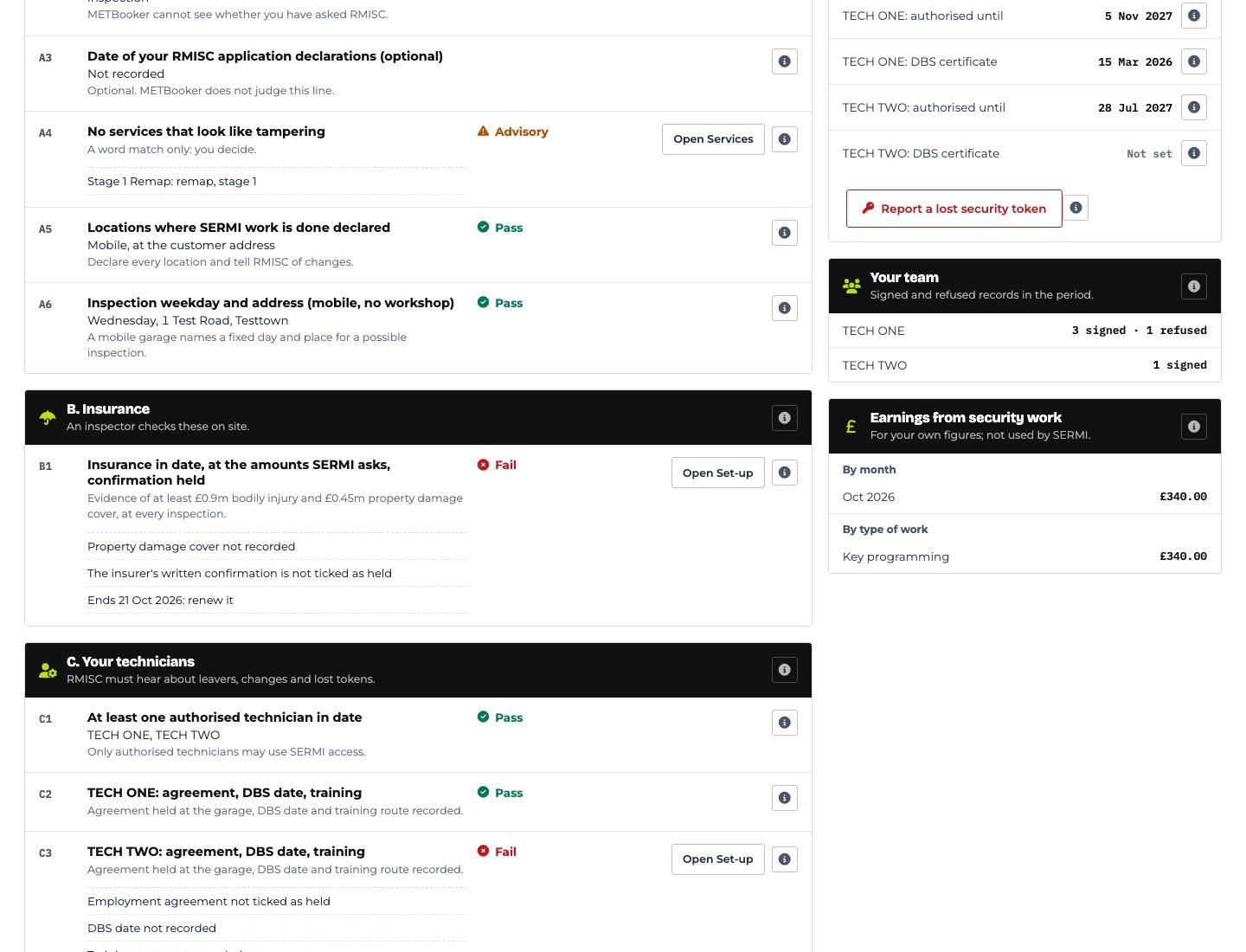
SERMI Records: 27 features
- SERMI record on the booking
- Guided checks in SERMI's order
- RMISC's five job situations
- VIN and V5C scanner
- VIN match
- No-V5C paperwork
- ID and authority capture
- On-screen signature
- Sign only when complete
- Refusals kept as evidence
- Stolen-check recording
- Free DVLA logbook check
- Tamper-evident seal
- Corrections in the open
- Kept six years
- Inspection-sheet overview
- Practice inspection
- Inspection pack
- Records check
- Monthly portal check
- Worth a second look
- Deadline reminders
- Pre-arrival link
- Team and earnings views
- Encrypted and minimal
- Records stay yours
- SERMI help chapter
In all: more than 250 features, each one listed
Getting it running: a plain-English Setup Wizard turns a few answers into a checklist for your business, with free training and remote setup assistance. How setup and onboarding work
Where next
The platform connects to calendars, payment providers, vehicle data and your bookkeeping. See what connects and what it does.